Computer Hardware Repair & Diagnostic Flowchart
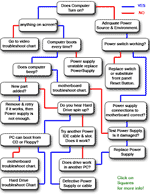
=> My Computer won't even turn on when I press the start button!
=> PC turns on but shuts down right away, or stays on but nothing happens.
=> My computer turns on but fails the POST (Power On Self Test).
=> Unstable Power Supply .
& more...
Computer Repair Flowchart
Hard Drives & Partitions Errors Troubleshoot Flowchart
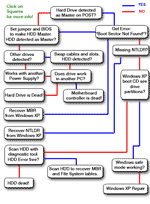
=> No System Disk Found or Boot Partition Errors!
=> Boot Sector Not Found.
=> NTLDR is Missing.
=> Bad Sectors.
& more...
Hard Drive Troubleshoot Flowchart
Motherboard Troubleshoot & Diagnostic Flowchart
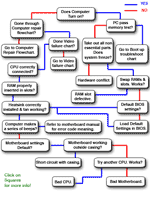
=> Defective RAM.
=> Burned CPU.
=> Hardware Conflict.
=> Bad Adapters.
& more...
Motherboard Troubleshoot Flowchart
Video Card Troubleshoot Flowchart
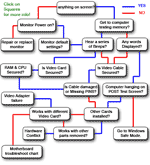
=> Nothing on the screen.
=> Wrong Settings, hardware conflicts.
=> Faulty cables.
=> Windows loads only in safe mode
& more...
Video card Troubleshoot Flowchart
Data Recovery

=> I NEED to Save / Recover my Data!
=> Erased Partition & Data.
=> Hard Drive not spinning up data recovery.
Go to Data Recovery
Windows XP Reset

=> No POST (Power On Self Test) error, but my computer won't boot Windows XP
Go to Windows XP Repair
=> Windows XP loads properly, but the system gives errors
Windows XP Restore
=> I prefer to Re-Install Windows XP, as my system is falling apart.
Windows XP Install Guide
Virus, Trojans & other Malwares
=> Free Antivirus Scan.
Anti-Virus Scan
=> Free Spyware Scan.
Spyware Scan
=> Free Firewall.
Go to Firewalls
=> Free Registry Scan.
Registry Scanners
Not Sure what the problem is, need a Systematic Hardware Test!

=> My computer is giving me Errors and crashes not sure why, I need to start with a
Quick Hardware Check
=> I get that famous Blue Screen!
Start with a full Hardware Check
=> I have NO IDEA what is wrong or where to begin!
Begin Here
=> I wish I could just ask someone.
Go to our Computer Repair Forum

No comments:
Post a Comment